How to Create a Topical Map: 5 Easy Steps (2026)
Creating a topical map is the single most strategic move you can make before publishing another word of content. Yet most SaaS founders skip it entirely.
By Nathan Rofkahr, Founder of Inbounder · Updated

Key Takeaways
- A topical map is a structured plan that organizes all your content around one core topic and its related subtopics, so search engines see you as a genuine authority
- Random publishing burns budget; topic cluster models drive measurably higher organic traffic growth based on HubSpot's findings
- Your core topic should pass the "one sentence test": if you can't describe your expertise in one sentence, narrow your focus
- Grouping subtopics into logical clusters before writing prevents content overlap and internal cannibalization
- Search intent validation using actual SERPs is more reliable than guessing what format a piece should take
- An impact-effort matrix helps you publish high-value content first instead of defaulting to whatever's easiest
- Your topical map is a living document, not a one-time exercise
Most SEO Strategies Fail Because There's No Map
Why Random Content Publishing Is Burning Your Budget
Think about the last ten blog posts your team published. Were they connected by a deliberate strategy, or did each one exist in its own little universe?
Most teams fall into what you could call "reactive publishing." A competitor puts out a piece on pricing strategies, so you scramble to write one too. A customer asks a question on a call, and someone turns it into a blog post. Each piece might be fine on its own. But collectively, they signal nothing to Google about what your site is actually about.
Topical authority marketing is the practice of building deep, interconnected expertise around a defined subject area so search engines (and increasingly AI answer engines) recognize your site as the go-to resource. Without a map guiding that effort, you're essentially throwing darts blindfolded.
HubSpot's marketing blog has documented how sites using topic cluster models see significantly higher organic traffic growth compared to sites publishing disconnected posts (HubSpot). The mechanism is straightforward: when Google crawls a site and finds dozens of interlinked pages covering every angle of a subject, it gains confidence that the site genuinely understands that subject. That confidence translates into higher rankings across the entire cluster, not just individual pages.
So if you're stuck at a revenue plateau and your organic channel feels flat, the problem probably isn't your writing quality. It's the absence of structure underneath it. And that's exactly what topical maps for SEO solve.
Step 1: Identify Your Core Topic (Your "Home Base")
The One Sentence Test for Choosing Your Core Topic
Core topic is the single broad subject your entire topical map revolves around, essentially your site's area of claimed expertise.
Choosing the wrong core topic is the most expensive mistake you can make here, because everything else branches from it. Too broad ("digital marketing") and you'll never build real depth. Too narrow ("email subject line A/B testing for fintech") and you'll run out of subtopics in a month.
Use this filter: Can you describe your business's expertise in one sentence that includes this topic? If you run a SaaS analytics platform, your core topic might be "product analytics" or "user behavior tracking." If you sell an email tool, it's probably "email marketing" or "email deliverability."
A few signals you've picked the right one:
- It has a high-volume pillar keyword (1,000+ monthly searches) with clear subtopic branches
- Your product or service directly solves problems within this topic
- You can brainstorm at least 20 subtopics without straining
- Competitors ranking for this topic are beatable, not entrenched Wikipedia-level authorities
If you're building a B2B topical authority strategy, your core topic needs to map directly to your buyer's problem space, not your product's feature set. That distinction matters more than most teams realize.
Step 2: Generate Subtopics Using Search Data
How to Use Google's "People Also Ask" and Autocomplete
This is where the map starts taking shape. And honestly, this step is more fun than it sounds.
Subtopic is a specific angle or question within your core topic that warrants its own dedicated piece of content. Type your core topic into Google and pay attention to three things: autocomplete suggestions as you type, the "People Also Ask" boxes in the results, and the "Related searches" at the bottom. Each of these is Google telling you exactly what real people want to know.
For example, if your core topic is "topical authority," Google's autocomplete might surface: "topical authority vs domain authority," "how to build topical authority," "topical authority checker." Those are subtopics. Write them all down.
Free and Paid Tools for Subtopic Discovery
Beyond Google itself, you have options:
- Google Search Console (free): Look at queries your site already gets impressions for but doesn't rank well on. These are subtopics Google already associates with your domain.
- AlsoAsked.com (free tier): Visualizes "People Also Ask" data as a branching tree, perfect for seeing how subtopics relate to each other
- Ahrefs or Semrush (paid): Use their keyword clustering features to pull hundreds of related terms and group them by parent topic. Semrush's research has shown that sites covering 80%+ of subtopics within a cluster consistently outranked sites covering only a handful.
- AnswerThePublic (free tier): Generates question-based queries, which are gold for informational content
The goal isn't to find every possible subtopic right now. Aim for 30–50 candidates. You'll prune and prioritize later.
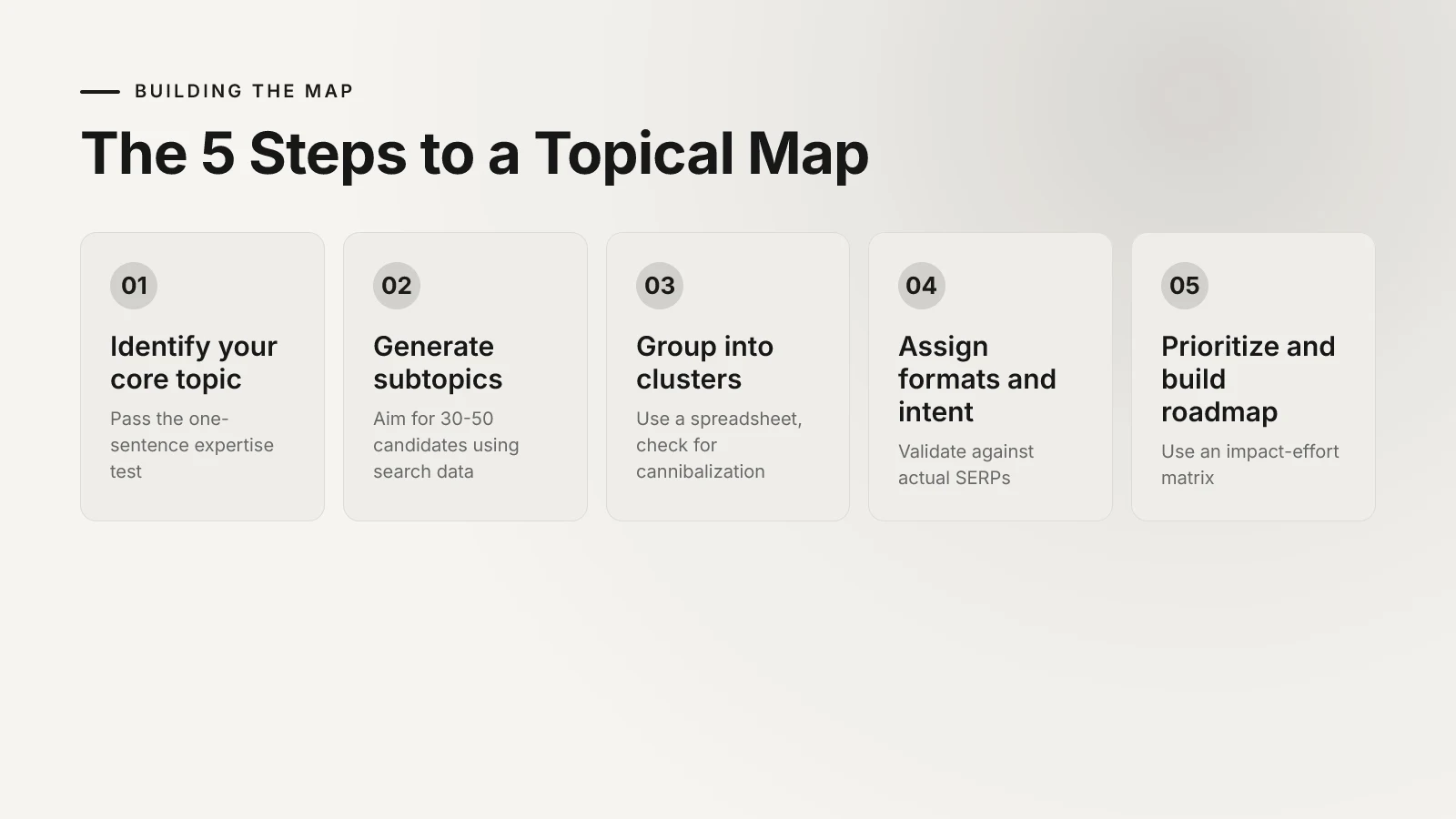
Step 3: Group Subtopics Into Logical Clusters
The Spreadsheet Method for Organizing Your Map
This step is where most people's eyes glaze over. But it's the structural backbone of your entire content operation, so stay with me.
Topic cluster is a group of closely related subtopics that all support one pillar page and link to each other. Open a spreadsheet with these columns: Subtopic, Target Keyword, Search Volume, Cluster Name, Search Intent, Content Format, and Priority.
Now sort your 30–50 subtopics into groups. You're looking for natural thematic overlaps. Subtopics about "measuring" something go together. Subtopics about "tools" or "how-to" processes form their own cluster. Questions about "mistakes" or "common problems" form another.
Color-code each cluster. This sounds trivial, but visual grouping reveals gaps immediately. If one cluster has twelve subtopics and another has two, either the small cluster should be absorbed into a larger one, or you haven't done enough research on it yet.
A critical check at this stage: look for cannibalization risks. If two subtopics target nearly identical keywords, they'll compete with each other in search results. Merge them into a single, more comprehensive piece. Moz's Whiteboard Friday series has covered this extensively: internal keyword cannibalization is one of the most common (and most overlooked) reasons pages underperform. When you measure topical authority later, cannibalized pages are often the first problem that surfaces.
Step 4: Assign Content Formats and Search Intent
Matching Each Subtopic to the Right Content Type
Search intent is the underlying goal behind a user's query, typically categorized as informational, navigational, commercial, or transactional.
This is where a lot of topical maps go wrong. Teams assign content formats based on what's convenient ("we're good at writing listicles, so everything's a listicle") instead of what the searcher actually needs.
A subtopic like "best project management tools" has commercial intent. The searcher wants a comparison, not a philosophical essay. But "why do projects fail" is informational. That person wants depth, context, maybe even a framework. Giving them a product comparison would feel like a bait-and-switch.
How to Validate Intent Using SERP Analysis
Don't guess. Google the keyword and look at what's actually ranking. If the top five results are all long-form guides, write a long-form guide. If they're comparison tables, build a comparison table. Google has already tested what format satisfies that query. Respect the data.
For each subtopic in your spreadsheet, add:
- Dominant SERP format (listicle, guide, comparison, tool page, video)
- Intent type (informational, commercial, transactional)
- Content format you'll use (should match the dominant format unless you have a strong reason to differentiate)
This alignment between intent and format is also fundamental to building topical authority through proven steps. Get it wrong, and even well-written content won't rank because it doesn't satisfy the query.
Step 5: Prioritize and Build Your Publishing Roadmap
The Impact-Effort Matrix for Content Prioritization
You now have a structured map. But publishing everything at once isn't realistic, especially for lean teams. So you need to prioritize ruthlessly.
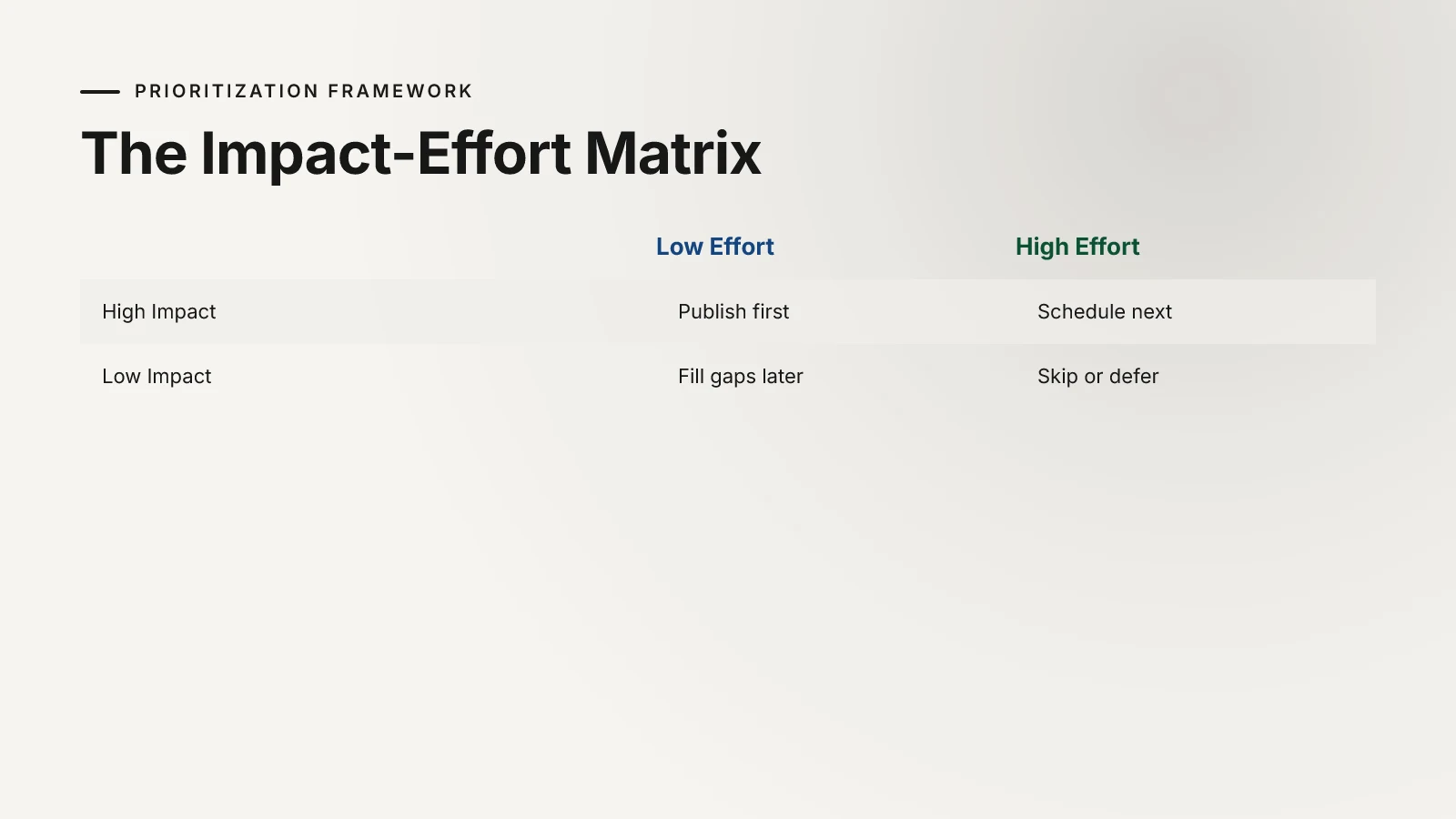
Impact-effort matrix is a 2x2 framework that plots each content piece by its potential business impact (traffic, conversions, authority) against the effort required to produce it.
Plot each subtopic on this matrix:
- High impact, low effort (publish first): These are typically long-tail keywords with clear intent and low competition. Quick wins that start building topical coverage fast.
- High impact, high effort (schedule next): Your pillar pages and comprehensive guides. They take time but anchor the entire cluster.
- Low impact, low effort (fill gaps later): Short supporting pieces that round out coverage without moving the needle on their own.
- Low impact, high effort (skip or defer): Be honest about these. Some subtopics look important but won't drive traffic or conversions. Defer them.
Orbit Media's Annual Blogging Survey (2025) found that the average blog post takes over four hours to write, with high-performing posts taking significantly longer. When you factor in that reality, publishing order becomes a resource allocation decision, not just a content calendar exercise.
Also consider topical relevance in your link building efforts as you sequence content. Publishing a cluster of related pieces close together gives you natural internal linking opportunities and sends stronger topical signals to search engines.
For ecommerce brands, the prioritization logic shifts toward product-adjacent content. If that's your situation, a topical authority system built for ecommerce addresses those nuances directly.
Summary: Your Topical Map Is Your Growth Engine
A topical map isn't a nice-to-have planning document. It's the structural foundation that determines whether your content compounds into authority or scatters into noise.
The five steps again, distilled:
- Pick one core topic that aligns with your expertise and has enough subtopic depth
- Mine search data for 30–50 subtopics using free and paid tools
- Group subtopics into clusters using a color-coded spreadsheet, checking for cannibalization
- Assign formats and validate intent by analyzing what's actually ranking in SERPs
- Prioritize with an impact-effort matrix and build a realistic publishing sequence
Action Steps: Build Your First Topical Map This Week
- Today: Write your one-sentence expertise statement and identify your core topic
- Tomorrow: Spend 45 minutes in Google Autocomplete, People Also Ask, and one keyword tool collecting subtopics
- Day 3: Sort everything into clusters in a spreadsheet using the column structure above
- Day 4: SERP-check your top 10 priority subtopics and assign content formats
- Day 5: Plot your impact-effort matrix and lock in your first month's publishing calendar
You don't need a perfect map. You need a functional one you iterate on as you publish and learn what resonates. Start this week.
Frequently Asked Questions
What is a topical map in SEO?
A topical map is a strategic document that organizes all planned content around a central topic and its related subtopics. It defines what you'll write, how pieces connect to each other through internal links, and what search intent each piece targets. Think of it as a blueprint for building topical authority in a specific subject area.
How many subtopics should a topical map include?
Most effective topical maps start with 30–50 subtopics, though large sites in competitive niches may map out 100 or more. The key is covering enough angles that search engines see comprehensive expertise, without stretching into subtopics that don't align with your core business.
How long does it take to build a topical map?
For a focused niche, you can build a functional first draft in three to five days using the steps outlined above. Refining it based on competitive analysis and search volume data might take another week. The map itself is a living document that evolves as you publish and gather performance data.
Do you need paid tools to create a topical map?
No. Google Autocomplete, People Also Ask, Google Search Console, and free tiers of tools like AlsoAsked.com and AnswerThePublic provide enough data to build a solid map. Paid tools like Ahrefs or Semrush speed up the process with keyword clustering and volume data, but they aren't required to get started.
What's the difference between a topical map and a content calendar?
A content calendar is a scheduling tool that tells you when to publish. A topical map is a strategic framework that tells you what to publish and why. The map informs the calendar, not the other way around. Without a topical map, your calendar is just a list of dates with random topics attached.
How often should you update your topical map?
Review your map quarterly at minimum. As you publish content and track performance through tools like Google Search Console, you'll discover new subtopic opportunities, identify gaps, and find pieces that need consolidation. Treat it as a living strategy document, not a one-time deliverable.
Related articles
B2B Topical Authority Strategy: The Authority Grid for SaaS Founders
A B2B topical authority strategy works when you cover one buyer job completely — problem-aware to product-aware — before touching the next. The Authority Grid turns that rule into a plan a founder can actually execute.
Measuring Topical Authority: 5 Essential Metrics
Measuring topical authority requires tracking five specific metrics that most SaaS founders completely ignore, even while obsessing over vanity numbers like domain authority.
How to Build Topical Authority: The 90-Day Founder Sprint (2026)
You build topical authority by publishing one interlinked cluster — a pillar plus about 12 answer-first articles on a topic you can own — in a focused 90-day sprint. Here is the exact plan, including what 13 unindexed articles on our own site taught us to do differently.
Build topical authority with Inbounder
Visual topic clustering, AI-powered content generation, and direct CMS publishing — all in one platform.